Mobile Proxy vs Residential vs Datacenter Proxies: Complete Comparison (Expanded 2025 Edition)
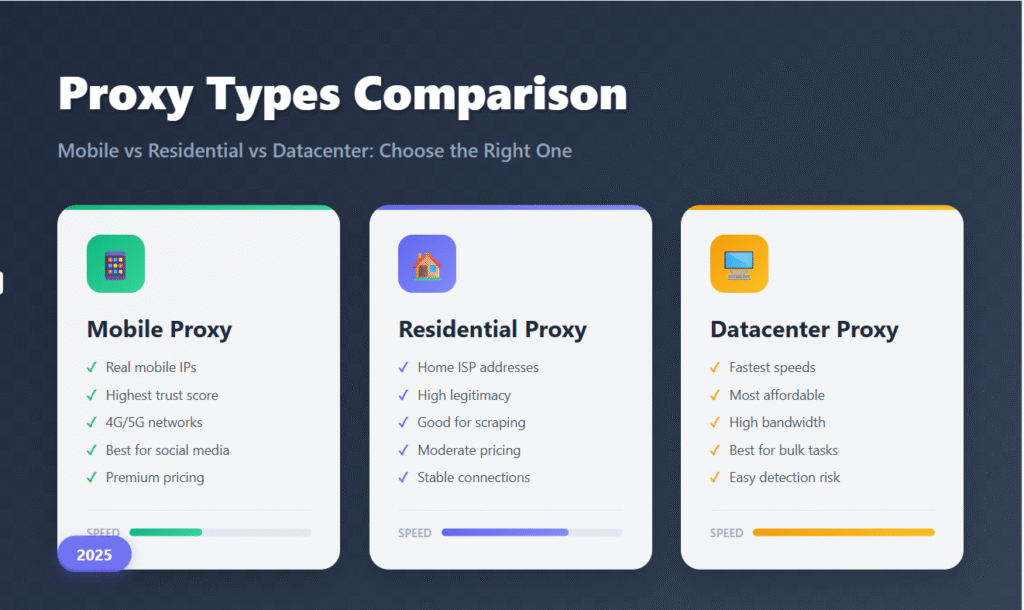
Proxy infrastructure has matured into three dominant families that solve different problems: datacenter, residential, and mobile proxies. Each carries unique strengths, tradeoffs, and cost profiles. The right choice determines reliability, success rates, and total cost of ownership.
This expanded 2025 edition blends a full comparison of proxy types with a vendor-neutral, practical field manual on how to evaluate, test, and operate them in real projects. You’ll find decision frameworks, configuration patterns, validation checklists, and concrete examples for common workloads.
I. Understanding Proxy Types: The Fundamentals
What Are Proxies?
A proxy is an intermediary that forwards your requests to a site or app and returns the response. To the destination, the traffic appears to originate from the proxy’s IP, not yours. This enables privacy, geo access, rate distribution, and scale.
The main differences between proxy families stem from where the IP originates and how it’s provisioned. Origin dictates authenticity, speed, detection likelihood, and cost.
II. The Evolution of Proxy Technology
Proxy tech progressed from simple server relays to diversified networks that model real users. A practical way to view the evolution:
- First generation: datacenter IPs for speed and low cost
- Second generation: residential IPs from consumer ISPs for authenticity
- Third generation: mobile IPs via carrier networks for top trust and organic rotation
Today, many stacks combine multiple types: datacenter for bulk throughput, residential for guarded targets, and mobile for critical sessions where success rate matters more than cost.
III. Datacenter Proxies: Speed and Efficiency
Technical Architecture
Datacenter proxies run on servers in commercial facilities with multi-gigabit connectivity, redundant power/cooling, and 24/7 operations. They’re easy to scale and straightforward to manage.
Typical components:
- High-bandwidth dedicated servers
- Enterprise monitoring and network management
- Redundant power and cooling for uptime
- APIs and dashboards for automation
Advantages
Performance – consistently fast and low latency for throughput-heavy tasks.
Cost – most affordable per IP, especially at scale.
Reliability – predictable infrastructure and uptime.
Management – bulk provisioning and control are trivial.
Disadvantages
Detectability – many platforms identify DC ranges and treat them cautiously.
Location – geography clusters around DC cities, limiting precise city/neighborhood targeting.
Shared reputation – neighbors on the same ranges can affect success rates.
IV. Residential Proxies: Authenticity and Trust
Technical Architecture
Residential proxies route through consumer broadband connections assembled via P2P participation, SDK/app partnerships, or ISP/router agreements. ISPs allocate the IPs, which appear as normal home users.
Common characteristics:
- Distributed home internet nodes
- ISP-assigned IPs from residential ranges
- Speed tied to the quality of each line
- Geography that mirrors real population distribution
Advantages
Authenticity – seen as real consumer traffic, which lowers challenge rates and blocks.
Geo precision – granular location control is possible down to city level.
Diversity – large pools across ISPs reduce repetition and exhaustion.
Disadvantages
Performance variability – depends on household connectivity.
Cost – higher than DC due to distributed complexity.
Consent and ethics – ensure proper user opt-in and transparent bandwidth use.
Session control – stickiness and rotation options vary by provider.
V. Mobile Proxies: The Premium Solution
Technical Architecture
Mobile proxies provide IPs from carrier networks using smartphones or LTE/4G/5G modems. IPs change organically with tower/session events, which resembles real user behavior.
Typical components:
- Physical handsets or cellular modems
- 3G, 4G/LTE, or 5G connectivity
- Dynamic carrier IP pools
- Natural IP rotation tied to network behavior
Advantages
Trust – generally the highest success rates on sensitive platforms.
Modern speeds – LTE/5G deliver competitive throughput and latency.
Organic rotation – mirrors real user changes and reduces linkage.
Social performance – particularly effective for mobile-first ecosystems.
Disadvantages
Expense – devices, data plans, and maintenance push costs up.
Data caps – carrier allowances can constrain usage.
Coverage – availability depends on where hardware can be hosted.
Complexity – deployment requires more hands-on expertise.
VI. Detailed Performance Comparison
| Dimension | Datacenter | Residential | Mobile |
|---|---|---|---|
| Trust on guarded sites | Moderate | High | Very high |
| Speed & latency | Fastest, low latency | Moderate, variable | Good on modern carriers |
| Cost | Lowest | Medium | Highest |
| Rotation behavior | Manual/provider-driven | Sticky & rotating options | Organic carrier events |
| Best for | Permissive scraping, bulk | Guarded sites, geo precision | Social, high-sensitivity |
| Watch-outs | Easier to flag | Cost, consent/ethics | Price, data caps, NAT |
Speed and Latency (indicative)
Datacenter: ~25–1000+ Mbps, ~10–50 ms
- Fastest aggregate throughput
- Consistent links
- Optimized routing
Residential: ~1–100 Mbps, ~50–200 ms
- Varies by household line quality
- Adequate for most tasks
- More hops increase latency
Mobile: ~10–200 Mbps, ~30–100 ms
- Good with modern carrier networks
- 5G can exceed typical residential speeds
- Improves as carriers upgrade
Detection and Trust Scores
Relative trust ranking (1 to 10): Mobile ~9.5, Residential ~8.5, Datacenter ~6.
Platform behavior (indicative success):
Social media
- Mobile: excellent
- Residential: very good
- Datacenter: often limited by protections
E-commerce
- Mobile: excellent stability
- Residential: very good consistency
- Datacenter: fair to moderate
Search engines
- Mobile: excellent
- Residential: good
- Datacenter: limited by stricter anti-abuse
VII. Use Case Analysis
Web Scraping and Data Collection
Depends on target and volume
General crawling:
- Datacenter: ideal for permissive sites at scale
- Residential: better for guarded sites that filter DC IPs
- Mobile: premium for fragile targets or mobile content
Social platform data and profiles:
- Mobile: recommended for highest continuity
- Residential: workable budget alternative with tuning
- Datacenter: often unsuitable due to blocks
SEO and SERP Monitoring
Prefer Residential or Mobile because search engines push back on DC IPs. Location precision is valuable for rank checks and SERP feature validation.
Ad Verification and Monitoring
Mobile or Residential provide authentic perspectives for both mobile and desktop ad stacks, improving accuracy when auditing creative delivery and placement.
Social Media Management
Mobile offers the best safety margin on social platforms. High-quality residential can substitute with careful session and fingerprint discipline.
Market Research
Residential or Mobile enable accurate geographic sampling for local offers, availability, and content personalization.
Price Monitoring and E-commerce
Residential or Mobile reliably capture real user pricing and mobile-specific offers. For large catalogs, mix DC for inventory pages and RES/MOB for checkout flows.
VIII. Cost-Benefit Analysis
Typical Monthly Pricing
Datacenter:
- Dedicated: ~$2–$5 per IP
- Shared: ~$0.10–$0.50 per IP
- Best for: high-volume, low-sensitivity tasks
Residential:
- Premium: ~$5–$15 per GB
- Budget: ~$2–$8 per GB
- Best for: authenticity where budget still matters
Mobile:
- Premium: ~$50–$200 per month
- Budget: ~$20–$80 per month
- Best for: high-sensitivity and social workloads
Return on Investment Considerations
Datacenter – unbeatable throughput economics when targets allow. Costs stay predictable even at very high volumes.
Residential – balanced spend versus access to guarded properties, with strong geo control.
Mobile – highest unit cost offset by superior success rates in critical flows where failure is expensive.
IX. Technical Implementation Guide
Configuration Best Practices
Datacenter:
Protocol: HTTP/HTTPS, SOCKS5
Rotation: ~10–60 minutes when required (avoid mid-login)
Concurrency: high (100+ per IP)
User agents: align with target platform; keep pools small and realistic
Headers: keep consistent; avoid obvious automation signaturesResidential:
Protocol: HTTP/HTTPS (SOCKS5 preferred if offered)
Rotation: ~10–30 minutes; prefer sticky for authenticated flows
Concurrency: moderate (10–50 per IP)
User agents: diverse and believable; map to geo
Cookie strategy: persist per profile; avoid cross-geo reuseMobile:
Protocol: HTTP/HTTPS, SOCKS5
Rotation: ~15–60 minutes aligned to carrier events; avoid hard resets mid-session
Concurrency: low (≈1–10 per IP)
User agents: mobile-specific; keep device model consistent
Headers: include realistic mobile headers (accept, viewport-related when applicable)
Integration Considerations
APIs: DC vendors usually offer the richest automation controls; residential exposes geo/sticky options; mobile varies widely by provider.
Tooling: Most automation stacks support all three. Mobile may need extra header/device tuning. Residential benefits from sticky sessions and cookie discipline.
X. Quality Assessment Framework
Evaluating Proxy Providers
Key performance indicators:
- Success rate on your specific targets
- Speed and throughput consistency
- Pool size and ASN diversity
- Geo coverage by country/city
- Support quality and responsiveness
- Uptime and stability
- Detection rate and block frequency
Testing methodology:
- Measure speed/latency at different times of day
- Track success vs block rates on real targets
- Verify IP location and ISP/ASN with multiple sources
- Test session persistence over hours
- Confirm rotation cadence and failure behavior
XI. Future Trends and Predictions
5G and Beyond
Wider 5G pushes mobile proxies toward gigabit speeds with lower latency and more resilient connectivity, enabling heavier mobile-first workloads like high-frequency verification and real-time monitoring.
Machine-Assisted Management
Adaptive routing, predictive rotation, anomaly detection, and automated failover will optimize pools using historical outcomes and live feedback loops.
Privacy Regulations
Expect stricter consent, transparency, and compliance checks for residential participation. Providers will need clearer user disclosures and opt-in models.
Market Dynamics
Consolidation and specialization will continue, raising baseline quality while segmenting by use case (ad verification, travel, social, commerce).
XII. Choosing the Right Proxy Type
Decision Framework
Step 1: Define requirements – targets, geography, performance, budget, and team skills.
Step 2: Assess risk – cost of blocks, compliance, sensitivity, business impact.
Step 3: Plan for scale – volume now vs later, infrastructure complexity, management overhead.
Step 4: Analyze ROI – TCO, success rates, efficiency gains, risk reduction.
Recommendation Matrix
High volume, low sensitivity – Datacenter first; budget residential as fallback.
Medium volume, medium sensitivity – Residential primary; premium DC as backup.
Low volume, high sensitivity – Mobile first; premium residential alternative.
Social and mobile-first platforms – Mobile preferred; quality residential second; avoid DC where failure is costly.
XIII. Hands-On Proxy Guide (Neutral, Practical, Rewritten)
Neutral 101: where proxies fit, when to use them instead of a VPN, how to test them correctly, and what providers sometimes understate. No endorsements or affiliate angles – just mechanics and checks you can run yourself.
VPN vs Proxies — practical differences
Proxy – scoped to the app or profile you route through it (browser, automation tool, curl). Supports HTTP/SOCKS. Can be rotating, sticky, or static. Lightweight and flexible for multi-accounting and scraping. Misconfiguration can leak origin IP in some apps, so validate first. Some proxy IPs are recognizable as proxies.
VPN – transports all device traffic via an encrypted tunnel. Typically one IP per session; rotation is rare. Great for device-wide privacy and hostile networks. Overhead and centralized endpoints may slow things down; VPN exits become broadly known as VPNs over time.
Read more: Mobile VPN vs Mobile Proxy – What is the difference?
When to use which
- Proxies: multi-account management, automation, scraping, per-app geo testing
- VPNs: full-device privacy, public Wi-Fi, bypassing local network limits
- Combined: VPN as a base layer, proxies per application/session for flexibility
A plain-English look at proxies
A proxy relays your HTTP/HTTPS request so the destination sees the proxy’s IP. Many residential and mobile networks are effectively real laptops or phones sharing connectivity in a controlled way – for a short period, you borrow that connection so requests appear to originate from that device.
Why people use proxies
- Testing region-specific content
- Account operations at scale with isolation
- Large-scale crawling and data collection
- Privacy and origin obfuscation (varies by type)
Proxy families in practice
- Datacenter – fastest and lowest cost; easiest to flag
- Residential – consumer ISP IPs; higher authenticity and price
- Mobile – carrier IPs; excellent trust; often behind carrier NAT
- ISP/static residential – long-term delegated residential-like blocks
- RDP/remote desktops – full remote machines instead of pure proxy endpoints
Rotating, Sticky, Static — what they mean
- Rotating – IP changes per request or short interval. Great for crawling. Risky for multi-step logins unless you control rotation.
- Sticky – same IP for a time window. Good for signups and short authenticated flows. Providers differ on whether you receive the same IP next session.
- Static – stable IP across sessions. Best for persistent accounts and verification flows that require fixed addressing.
How to test and validate proxies
- Connectivity – verify TCP/HTTPS to your destination via the proxy.
- Geolocation – cross-check in multiple IP lookup services and with a region-locked resource.
- Reverse DNS/ASN – confirm ISP vs cloud datacenter ownership.
- Browser alignment – headers, TLS fingerprint, and DNS behavior should match your client profile.
- DNS leak – ensure lookups use expected resolvers, not your origin ISP.
- Blacklist scans – useful signal but not definitive.
- Speed/latency – measure TTFB and sustained throughput.
No single tool covers everything. Combine free DNS-leak checks with professional inspection where needed. Be cautious with sites that exist mainly to funnel traffic to affiliates.
Quick Proxy Sanity Checks
HTTP reachability
curl -x http://user:pass@ip:port -I https://www.example.com/Geo confirmation
curl -x http://user:pass@ip:port https://ifconfig.meDNS behavior
curl -x http://user:pass@ip:port https://dnsleaktest.com/Provider fine print to scrutinize
- Pool reuse/shared IPs – concurrency with strangers can poison reputation.
- Prior abuse – legacy blocks only show up in exit-IP checks.
- NAT/carrier NAT – many clients may share one public IP.
- Rotation policy – clarify cadence and triggers; mid-session switches break logins.
- Geo fuzzing – stated country may be approximate; validate with target services.
Vendor Questions Before You Buy
- Is the proxy dedicated exclusive to me
- Exact sticky session TTL
- Auth method (prefer user/pass; avoid strict IP-allow lists where impractical)
- Rotation cadence and behavior on failure
- Pool composition by ASN and country
- Abuse handling and replacement policy
- Bandwidth and concurrency limits
Practical workflows
- Pair one anti-detect browser profile with one sticky proxy for account operations
- Use short rotating sessions for scraping with idempotent retries
- Test the fingerprint + proxy combo on a neutral page before production
XIV. Troubleshooting & Playbooks
Frequent Symptoms
- Sudden login challenges or soft blocks
- Inconsistent geolocation across checks
- High request failure rate under load
- Good speed tests, poor real-world success
Likely Causes
- Mid-session IP rotation or pool reuse
- DNS leakage or resolver mismatch
- Unrealistic headers/TLS, noisy automation patterns
- IP with prior abuse or blacklist history
Quick Fixes (Order of Operations)
- Lock rotation: use sticky or static for the entire login flow.
- Align DNS: confirm resolvers match the proxy’s geography.
- Normalize headers: reduce entropy; use consistent user agents.
- Swap exits: retest with a clean IP from a different ASN pool.
- Rehearse on neutral endpoints before the real target.
Conclusion
Choosing between mobile, residential, and datacenter proxies hinges on the outcomes you need, the detection safeguards you face, and the budget and expertise you can commit. Datacenter leads on cost and speed where allowed, residential balances authenticity and price for most business cases, and mobile delivers the highest trust for sensitive or social workloads. Combine sound testing, clear session strategy, and honest vendor diligence to build a proxy stack that is robust today and resilient tomorrow.